Best Colorado Trail Maps and Hiking Apps for 2026
Hiking apps have gotten very good. You can plan a route from your couch, download a topo tile in thirty seconds, and watch a blue dot crawl along a ridgeline in real time. For most Colorado day hikes, that workflow is enough.
The trouble is, Colorado is a state where the workflow breaks. Cold cuts your battery in half. There is no cell service in the San Juans or the Weminuche. Steep walls block GPS. A pine canopy in the Rio Grande can throw your blue dot fifty feet off the trail. The best hiking apps for Colorado are the ones that keep working when all of that happens at once.
The other piece most national guides skip: Colorado has its own free official trail app. It is called COTREX, and for a lot of trail-status questions, it beats every paid app on the market.
What you'll learn
- Why COTREX is the Colorado-specific tool every hiker should install
- When Gaia GPS earns its $40/year for backpackers and 14er climbers
- Where AllTrails still shines and where its user data goes sideways
- The case for onX Backcountry on private-boundary trails
- How CalTopo handles big multi-day route planning
- Which paper maps still belong in your pack
- How to pick the right app for the trip you are actually doing
The Colorado-specific pick: COTREX
COTREX stands for Colorado Trail Explorer. It is built and maintained by Colorado Parks and Wildlife, which means it is the closest thing the state has to an official trail map. It is free on iOS, Android, and the web, and there is no premium tier waiting to nag you.
The data is the headline. COTREX pulls in more than 39,000 miles of trail across BLM, U.S. Forest Service, state parks, county open space, and city park systems. If a trail in Colorado is on public land, there is a good chance COTREX has it. You can filter by use type, including hiking, mountain biking, OHV, equestrian, ADA accessible, and dog-friendly. That filter alone solves a problem most apps cannot, since AllTrails will happily route you onto a motorized two-track.
Offline maps are free. Tap a region, download it, and the trail data rides along with you into the dead zones. The app also pulls live snow and closure status from agency feeds, which matters more than most hikers realize. If a trailhead road is gated for elk calving or a wildfire closure dropped overnight, COTREX often shows it before AllTrails does.
Where it lags is the social layer. There are no thousands of recent photos, no review threads, no "is it muddy right now" comments. For a hiker who wants confirmed open/closed status, accurate ownership lines, and the lesser-known trails the crowds skip, that tradeoff is worth it. Use COTREX to find out if the trail is open and where it actually goes. Use a different app to find out what it looks like in October.
For backpackers: Gaia GPS
Gaia GPS is the app I see in the most thru-hiker pockets along the Colorado Trail. The base subscription runs $40 a year, with a Premium tier at $60 that adds private satellite imagery and detailed weather overlays.
The strength is layering. You can stack USGS 7.5-minute topo under a USFS overlay, flip on a satellite layer to check tree cover at a planned campsite, then toggle slope-angle shading to keep a winter route off avalanche terrain. Offline downloads are unlimited within reason, and route planning lets you draft a multi-day line on the desktop, then sync it to your phone. GPX import and export both work cleanly, so tracks from 14ers.com or a friend's Garmin slot right in.
Battery use is reasonable if you keep the phone in airplane mode and only wake the screen at decision points. For a backcountry hiker stringing together off-trail mileage in the Weminuche, the Gore Range, or the Sangre de Cristos, Gaia is the deep-map workhorse. It is not the app for casual trail discovery. It is the app for the trip you have been studying for three weeks.
For trail discovery: AllTrails
AllTrails is the app most Coloradans already have on their phone, and that is fair. The free tier covers basic trail info. AllTrails+ at $36 a year adds offline maps, wrong-turn alerts, and a few planning tools. The trail database tops 400,000 worldwide, with deep coverage of Colorado's popular trails.
The strength is community data. Recent photos tell you whether the wildflowers are out, whether the snowfield at 12,400 feet is still blocking the route, whether the trailhead lot was full at 7 a.m. last Saturday. For research on a busy trail, that volume of reviews is hard to beat.
The caveat is that the data is user-submitted. Routes get drawn on top of social trails, mileages get rounded, and the same algorithm that helps you find good hikes funnels everyone toward the same handful of trails. The crowding at Hanging Lake, Maroon Bells, and Hanging Lake's parking lot did not invent itself. Use AllTrails for popular, well-traveled routes. Cross-check anything obscure against COTREX or a paper map before you commit.
For private land: onX Backcountry
onX Backcountry runs $30 a year, and its core feature is land ownership. The map shows you exactly where public land ends and private begins, with parcel-level detail and landowner names where available. In Colorado, where checkerboard BLM and private inholdings are common across the Front Range foothills, the Eastern Plains, and the western slope, that information answers real legal questions before you cross a fence.
It is best known among hunters, but backpackers and peak baggers benefit just as much. If you are accessing a route that crosses a corner of private land, onX tells you whether there is a public easement, an access agreement, or nothing at all. The satellite, topo, and USFS layers are solid, and offline downloads work. It is not the app I would pick if I only had one, but it is the app I want any time the route gets close to a property line.
For route planning: CalTopo
CalTopo started as a tool for search-and-rescue teams, and it still feels like one. The free tier is more powerful than most paid apps, and the $50 Pro tier adds high-resolution imagery and additional layers. The interface is unapologetically desktop-first.
Where CalTopo shines is the planning stage. You can scan high-resolution USGS quads, overlay slope-angle shading for avalanche-aware route design, draw a multi-day route with auto-snapping to trails, calculate elevation gain and loss by segment, and print custom maps at any scale with a UTM grid. For a multi-day backpacking trip, a winter ski tour, or a Nolan's 14 link-up, CalTopo at the desk is the planning tool. Then export the route as GPX, drop it into Gaia or onX, and carry the printed map as backup.
The case for paper maps
Phones fail. They get dropped on talus, drained by cold, soaked in afternoon thunderstorms, or run flat after two days of heavier use than you planned. A paper map weighs an ounce, costs $15, and never needs charging.
The map sources that still matter in Colorado:
- USGS 7.5-minute topo quads at 1:24,000 scale. Free as PDFs from the USGS National Map. Printed copies run about $15. These show terrain in more detail than anything else, but the trail data is dated. Use them for terrain and route-finding, not for current trail tread.
- National Geographic Trails Illustrated maps, around $15 each. Waterproof, tear-resistant, and accurate. The Colorado titles cover Rocky Mountain National Park, the Indian Peaks, the Maroon Bells, the Weminuche, the Collegiate Peaks, and most other popular ranges. This is the paper map I carry on the trail.
- USFS Motor Vehicle Use Maps (MVUMs). Free from each national forest. Required if you are dispersed camping, since they show which roads are legal for vehicle travel and which are not.
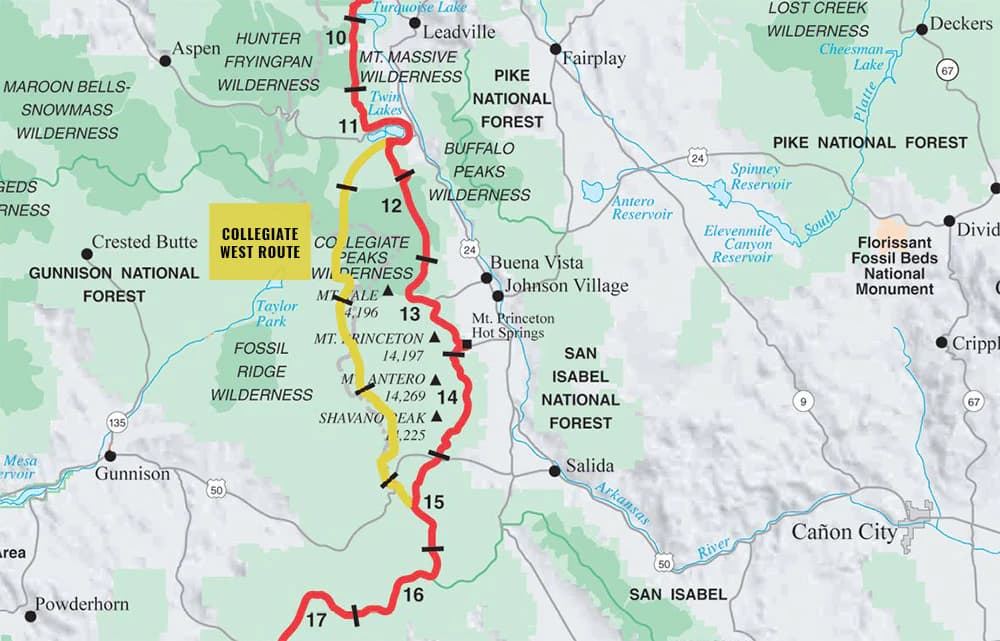
- Colorado Trail Foundation databook for thru-hikers on the CT or the Collegiate Loop. Mile-by-mile water, camp, and resupply data in a pocket booklet.
- COTREX printable maps. Free from the COTREX website for any region you draw.
Reading a topo well takes practice. The basics: contour lines close together mean steep, lines far apart mean flat, a V pointing uphill is a drainage, a V pointing downhill is a ridge. Carry a baseplate compass, adjust for Colorado's 8 to 11 degrees of east declination, and you can take a bearing off the map even when the phone is dead in your pack.
What to use when in Colorado
A rough decision tree that works for most trips:
- Day hike on a known, signed trail. AllTrails for recent photos and conditions, or COTREX for clean ownership and trail status. Either is fine. Both are better than fine if you download offline maps first.
- 14er climb on a standard route. COTREX or Gaia for the map, a GPX track from 14ers.com loaded in, and a printed route description. The Trails Illustrated map of the range as backup.
- Backcountry trip with off-trail sections. Gaia GPS Premium with the relevant USGS quads downloaded. A printed CalTopo map of the whole route with slope-angle shading. A baseplate compass.
- Multi-day route in unfamiliar terrain. CalTopo at the desk to design the route, Gaia in the field to follow it, a paper map and compass when both phones are dead.
- Anything near a property line. onX Backcountry, full stop.
Battery and offline-map tips
A few habits that keep navigation working when the trip gets long:
- Download offline maps at home over wifi. Cell tile downloads at the trailhead burn your battery before the hike starts.
- Carry a 10,000 mAh battery bank and a short cable. That is two full phone charges, which covers most three-day trips.
- Keep the phone in airplane mode all day. GPS still works without cell. Background app refresh is the silent battery killer.
- Drop screen brightness to about 30 percent. The high alpine sun makes 50 percent look fine when 30 is plenty.
- In cold weather, keep the phone in an inner pocket against your body. Lithium batteries lose 30 to 50 percent of their capacity below freezing, and a cold phone will shut off at 40 percent charge.
- Mark the trailhead as a waypoint before you leave the car. If you get turned around above treeline, a single waypoint and a bearing get you home.
Frequently asked questions
What is the best free hiking app for Colorado?
COTREX. It is the official Colorado Parks and Wildlife app, it covers more than 39,000 miles of state trail data, offline maps are free, and there is no paid tier. AllTrails has a usable free version, but COTREX is the better Colorado-specific free pick.
Is COTREX better than AllTrails?
For trail status, ownership, and Colorado-specific coverage, yes. For recent photos, reviews, and crowd-sourced conditions on popular trails, no. Most serious Colorado hikers run both.
Do I need cell service for Gaia GPS?
No, as long as you download the map area before you leave coverage. The GPS chip in your phone works without cell service. The piece that fails without offline maps is the visual map tile, which is why every Colorado hike should start with a download at home.
Are paper maps still worth carrying?
Yes. Phones get dropped, batteries die in the cold, and screens crack on talus. A National Geographic Trails Illustrated map weighs an ounce and costs about $15. On any trip more than a few miles from a trailhead, the paper backup is cheap insurance.
Which app is best for 14ers?
Gaia GPS for the map, plus a GPX track from 14ers.com loaded into the app. COTREX as a free alternative for the standard routes. AllTrails works for the most popular standard routes but gets thin once you move to harder peaks or alternate lines.
Does COTREX work outside Colorado?
No. COTREX is Colorado only. That is the point. For trips outside the state, Gaia, onX, and AllTrails all carry the national data.
Pack the right map, then go
Apps are good, paper is reliable, and the best setup uses both. For a quick day hike on a signed trail, COTREX or AllTrails with an offline download covers it. For backcountry mileage, Gaia plus a paper Trails Illustrated map is the combination that has saved more Colorado hikers than I can count. For a route that crosses a property line, onX answers the question your phone never thought to ask.
A few related guides that pair well with this one:
Get the Colorado 14er Packing Checklist (free PDF)
Plus a weekly note on the best Colorado trails, gear deals, and seasonal hike picks. No spam, unsubscribe anytime.
We respect your inbox. Unsubscribe anytime.